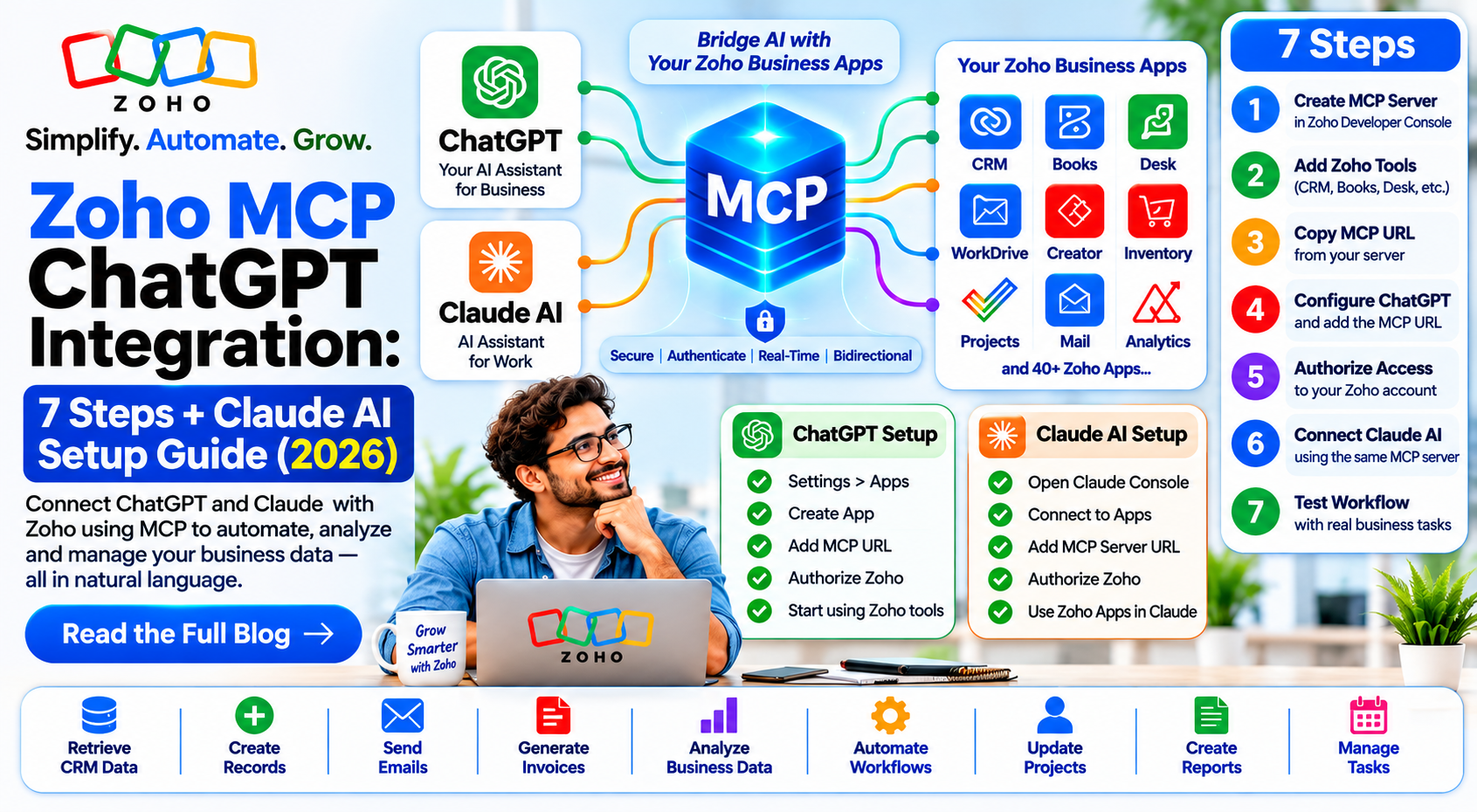
Create a Zoho MCP server in the Zoho MCP Console, add the required tools, and copy the generated server URL. Then connect it to ChatGPT as a custom MCP server, configure the supported authentication method (such as OAuth), and authorize access. Availability depends on your ChatGPT plan and workspace permissions. Zoho MCP is free to use, but it uses your existing Zoho API limits and subscription entitlements.
What Zoho MCP Is and Why Zoho MCP ChatGPT Integration Matters
MCP stands for Model Context Protocol, an open standard that lets AI tools call outside services. Zoho's Zoho MCP page says it connects language models to Zoho's APIs, data models and actions, so an AI can turn plain instructions into real work across your apps.
A Zoho MCP server is a server you create in the Zoho MCP console. You choose which tools it exposes, such as creating a lead or replying to a ticket. Per Zoho's getting started guide, the console also offers pre-configured servers for common workflows.
The Zoho MCP ChatGPT integration simply points ChatGPT at that server. ChatGPT then sees only the tools you added, and acts only after you approve access. That control is why a Zoho MCP ChatGPT integration suits small teams that want AI help without handing over full admin access.
Before You Start the Zoho MCP ChatGPT Integration
- A Zoho account with the apps you want to connect, such as CRM, Desk or Books.
An eligible ChatGPT plan. OpenAI's pricing page lists developer mode (beta) for Plus and Pro, not Free or Go. Business and Enterprise workspaces follow admin policies.
Admin rights in Zoho for the tools you plan to connect
A clear list of actions you want ChatGPT to perform. Fewer tools mean fewer mistakes, and a smaller Zoho MCP ChatGPT integration is easier to test.
Zoho MCP ChatGPT Integration: 7 Verified Steps
Steps 1 to 4 follow Zoho's implementation guide. Steps 5 to 7 follow OpenAI's Connect and test guide. ChatGPT menu labels change often; Zoho's own guides still show older labels such as Settings, Apps and Create App.
Step 1: Create a Zoho MCP server
Open the Zoho MCP console, click Create MCP Server, name it and click Create. Or pick a pre-configured server, such as CRM Data and Metadata Operations, and click Create.
Step 2: Add tools
In the Tools section, click Add Tools, search for your Zoho product, tick the tools you need and add them. Start with read-only tools. A read-only Zoho MCP ChatGPT integration lets you check answers before ChatGPT can change any record.
Step 3: Connect each tool with OAuth
Zoho asks you to authenticate added tools with OAuth 2.1, either on demand per user or through a shared connection set up by a Super Admin.
Step 4: Copy the server URL
Go to Connect in the left sidebar and copy the MCP server URL. It contains an API key, so treat it like a password. Anyone with this URL can use your Zoho MCP ChatGPT integration tools.
Step 5: Add a custom MCP server in ChatGPT
In ChatGPT, open Plugins, select the plus button and choose Add custom MCP server. Enter a name and description, and paste the Zoho URL as the MCP server URL.
Step 6: Set OAuth and approve access
Set authentication to OAuth, review the risk warning and confirm. Zoho's Zoho Billing MCP help says you then see two permission screens; review the permissions and accept both.
Step 7: Test in a new chat
Start a new conversation, select your Zoho app with @ or from the plus menu, and try a read request first. After adding tools in Zoho, select Refresh on the connection in ChatGPT.
That completes the Zoho MCP ChatGPT integration. Keep a short list of test prompts and rerun them whenever you change tools. Note the date and the tools enabled, so you can trace any change later.
Zoho MCP Claude Setup With Claude.ai and Claude Code
Zoho’s implementation guide does not include a Claude-specific section. However, Claude supports custom remote MCP servers, and Zoho MCP provides a remote HTTP server URL. This setup uses two documented paths:
Option A: Claude.ai (web, desktop and mobile)
Create the Zoho MCP server, add tools and copy the server URL (steps 1 to 4 above).
Open Claude and go to Settings → Connectors → Add custom connector.
Paste your Zoho MCP URL and click Add. If the server asks for OAuth, approve the sign-in in your browser.
In a new chat, open the “Add files, connectors and more” menu, turn the connector on and confirm the Zoho tools are listed.
On Team or Enterprise plans, a workspace owner may need to add the connector first under Organization settings → Connectors.
Option B: Claude Code (terminal)
1. Add the server with: claude mcp add --transport http zoho <YOUR_MCP_URL>. Use --scope user to make it available across all your projects.
Security and Permissions for Zoho MCP ChatGPT Integration
Write a simple policy: which tools are allowed, who can connect them, and which actions need a human check. Review the Zoho MCP ChatGPT integration tool list every quarter and remove tools nobody uses.
Zoho MCP ChatGPT Integration Pricing
Zoho's MCP pricing page says Zoho MCP is $0, with no separate subscription. Each action uses the API limits of your existing Zoho editions; it supports Zoho services and many third-party apps.
ChatGPT prices shown in US dollars on OpenAI's page; INR is approx. at ₹96.3 per dollar and may differ at checkout. In short, the Zoho MCP ChatGPT integration adds no Zoho fee; your cost is the ChatGPT plan and your Zoho editions. We have not included Claude Ai pricing, as it depends on your Google account and was not verified here.
Zoho MCP ChatGPT Integration Troubleshooting
Zoho MCP Server Use Cases
Zoho's MCP page gives sample prompts across sales, marketing, support and finance. Practical ideas for a Zoho MCP ChatGPT integration:
Quick Answers
Yes. Zoho lists it at $0; actions use your Zoho API limits.
OpenAI lists developer mode for Plus and Pro; Business and Enterprise follow admin settings.
No. Zoho's console and ChatGPT's custom server form need no code.
Yes, Zoho MCP can work with Claude AI, provided the connection and authentication are configured correctly.
Yes. Zoho says to treat it like a password.
Zoho MCP ChatGPT Integration FAQs
How do I set up a Zoho mcp chatgpt integration?
Create a Zoho MCP server, add and connect tools. copy the server URL, add it in ChatGPT as a custom MCP server with OAuth, approve access and test in a new chat.
What is a Zoho MCP server?
A server you create in the Zoho MCP console that chosen Zoho or third-party tools to AI clients through a secure URL.
How does Zoho mcp Claude setup work?
Zoho MCP connects Cloude AI to Zoho apps through an MCP server, using using OAuth authentication to securely access authorized tools and data.
Does ChatGPT Free support Zoho MCP?
No. OpenAI listed developer modes as unavailable on free and go.
Can ChatGPT change my zoho data?
Yes, if you add writing tools. Start with read-only tools and confirm each write action.
What if my server URL leaks?
Regenerate the API key in the Zoho MCP console and update the URL in ChatGPT.
Does Zoho MCP add extra API limits?
No. Zoho says each action counts against the api quota of the Zoho server involved?
References