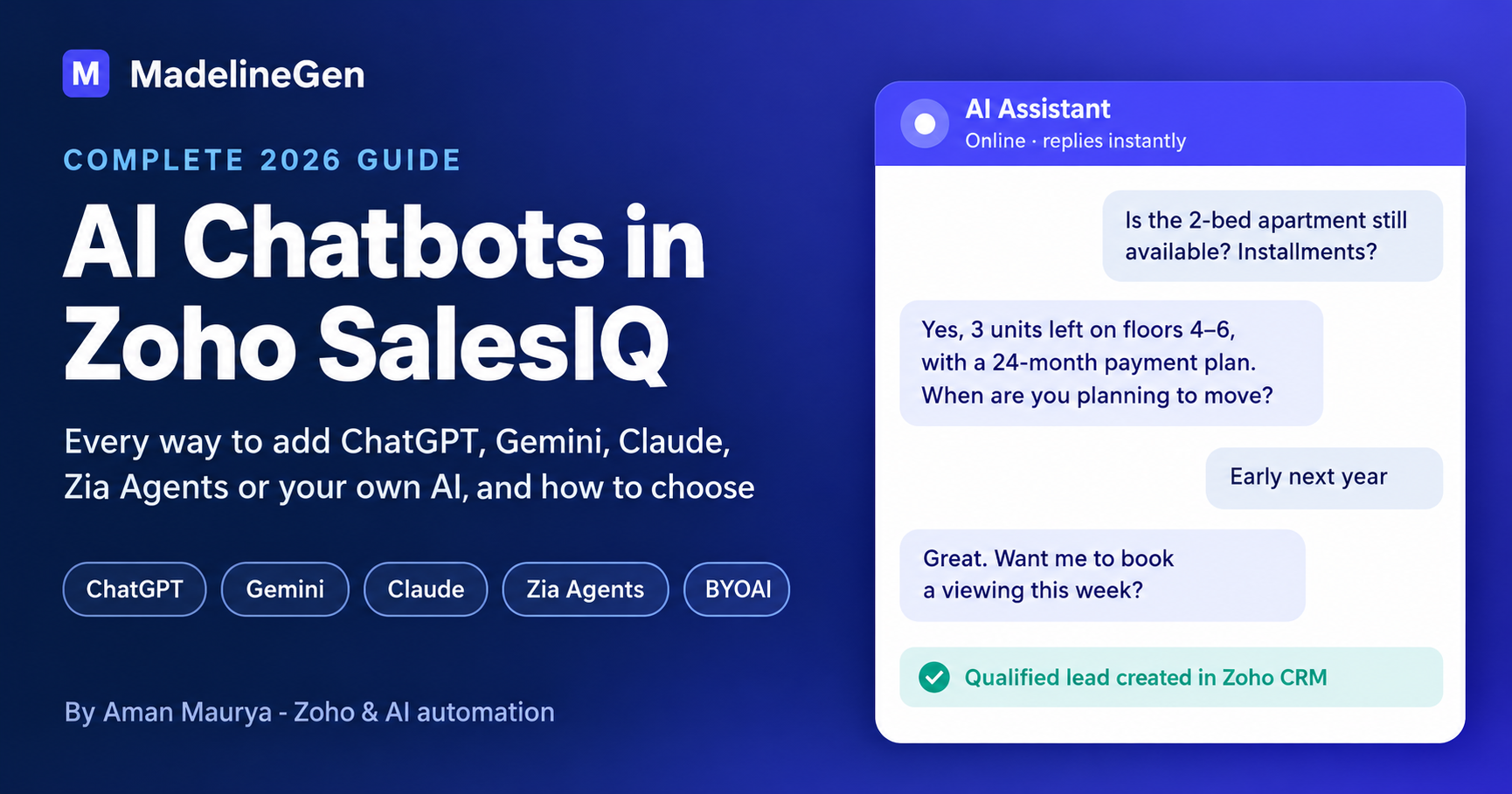
Zoho SalesIQ is no longer just a live chat widget with a Scripted bot. In 2026 you can run ChatGPT, Gemini, Claude, Zoho's own Zia model, a self-hosted LLM or fully autonomous Zia Agents inside it, connected to Zoho CRM, your knowledge base and every channel your customers use.
The problem is that there are now so many options that most businesses don't know where to start. This guide covers all of them in plain language: what each one is, when to use it, what it costs to run, and what goes wrong in real projects. It's written by the team at MadelineGen, a Zoho consulting and implementation agency, and based on AI chatbots we've built in Zoho SalesIQ for clients in real estate, insurance, HVAC and home inspection.
SEO details (not shown on the page
Table of Content
1. Who This Guide is For
2. Quick Answer
3. How It Works
4. Why Scripted Bots Fail
5. Build Routes
6. AI Model Options
7. Zia Agents
8. Knowledge Sources
9. Channels
10. Actions and Integrations
11. Human Handoff
12. Monitoring and Quality
13. Zoho MCP
14. Use Cases by Industry
15. Case Study
16. How to Choose
17. Implementation Steps
18. Cost Factors
19. Common Mistakes
20. Launch Checklist
21. Glossary
22. FAQ
23. Book a Free SalesIQ AI Review
24. About MadelineGen
25. About the Author
There are three ways to add AI to Zoho SalesIQ: Zoho's built-in AI, your own AI model, or an external bot platform.
- The most effective setup for most businesses is a Zobot that combines a guided lead-capture flow with an AI model, synced to Zoho CRM, with a clear human handoff.
- Zia Agents (Summer 2026) can take actions on their own, not just answer questions.
- Bring Your Own AI (BYOAI) lets Answer Bot run on almost any LLM, including self-hosted models.
- "Training" a SalesIQ bot almost always means connecting it to your content, not fine-tuning a model.
- The prompt, the knowledge base and the guardrails matter more than which AI model you pick.
1. Who This Guide Is For
- Business owners already using Zoho SalesIQ or Zoho CRM whose chatbot feels robotic or loses leads.
- Sales and support managers who want inquiries qualified before they reach the team.
- Zoho admins and developers comparing build routes, AI providers and technical limits.
- Teams evaluating SalesIQ against other live chat tools because of its AI features.
2. Quick Answer
- Use Zoho's built-in AI. Answer Bot, the Zia LLM, Zia Skills and Zia Agents. Fastest to set up, least custom work.
- Connect your own AI model. ChatGPT, Gemini, Claude, Perplexity, Grok or a self-hosted model, through the native ChatGPT card, Plugs, a Scripts bot or Bring Your Own AI.
- Plug in an external bot platform. Dialogflow, IBM Watson, Azure Bot Service, or your own bot server through a webhook. For most small and mid-sized businesses, the best result comes from a Zobot that combines a guided flow (for lead capture) with an AI model (for open questions), connected to Zoho CRM and handing off to a human at the right moment.
3. How It Works
- Channels. Where the visitor talks to you: website, WhatsApp, Instagram, Messenger, your mobile app.
- The bot. The Zobot or Answer Bot that controls the conversation, the rules and the flow.
- The AI model. The “brain” that understands questions and writes replies: ChatGPT, Gemini, Claude, Zia or another LLM.
- Knowledge. What the AI is allowed to answer from: your knowledge base, website pages, Zoho Desk articles and live Zoho CRM data.
- Actions and handoff. What happens next: a lead in Zoho CRM, a booking, a Cliq alert to sales, a ticket, or a transfer to a human.
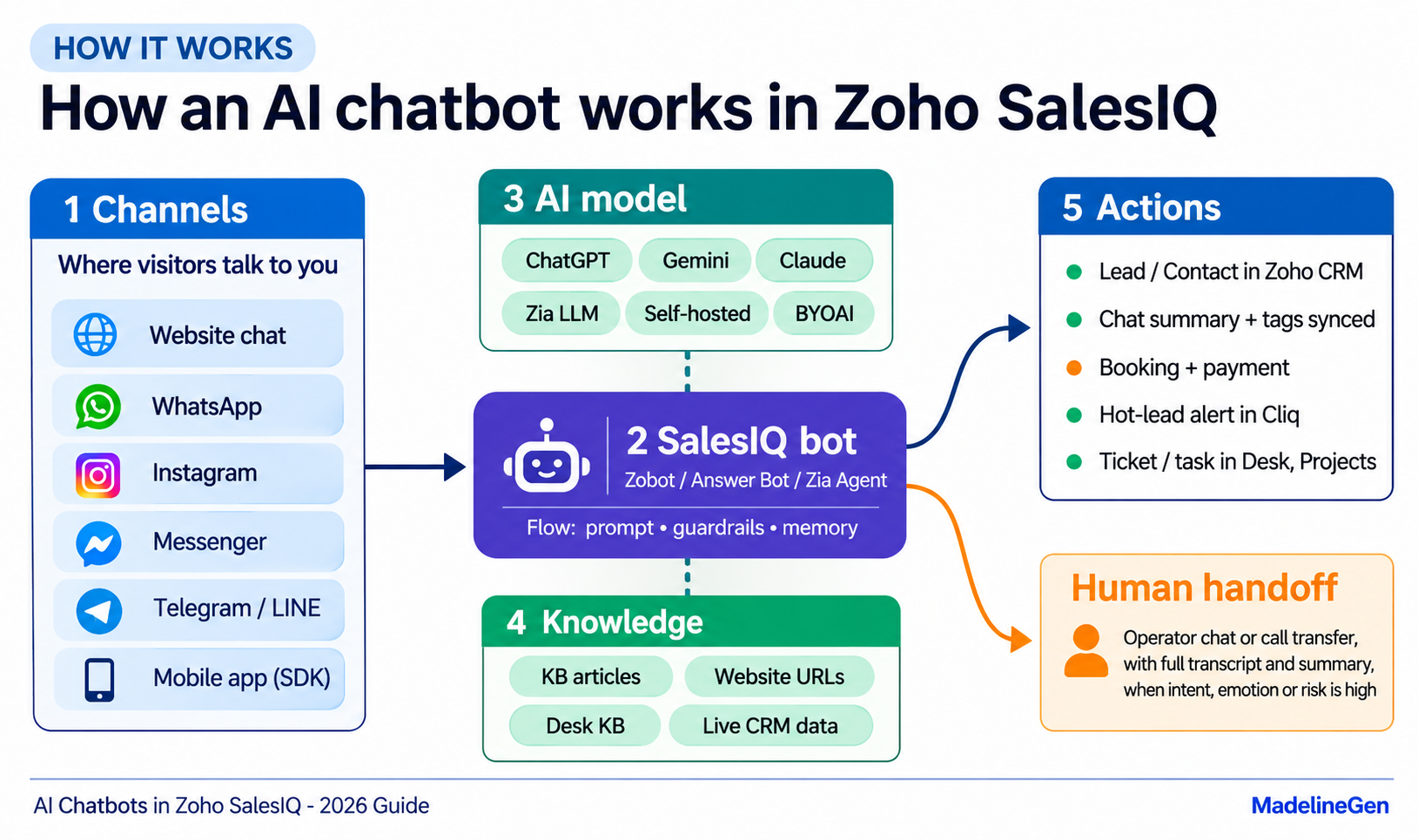
The bot is the part you design. The AI model is replaceable. That's an important point when choosing: a well-built bot can switch from ChatGPT to Gemini to Zia without being rebuilt.
4. Why Scripted Bots Fail
A traditional chatbot only understands what you scripted. When a visitor asks something slightly different, the bot either gives a wrong answer or replies with "Sorry, I didn't understand that." Most of those visitors leave, and you never find out who they were.
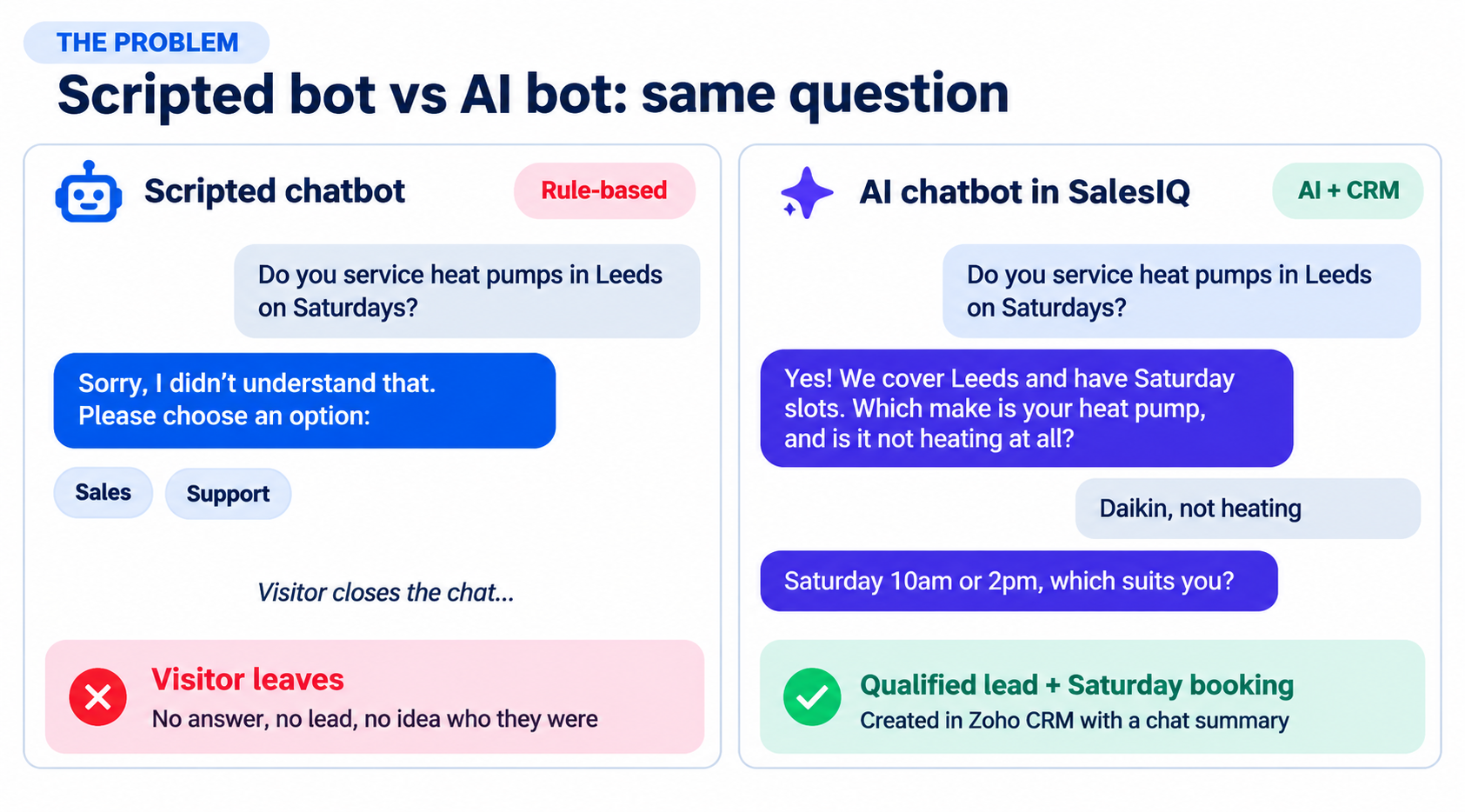
These are the pain points we see most often at MadelineGen in non-AI SalesIQ setups, and how AI fixes each one:
Every option below solves one or more of these.
5. Build Routes
SalesIQ gives you several platforms to build an AI bot on. Here's what each one is, when to use it, and its limits.
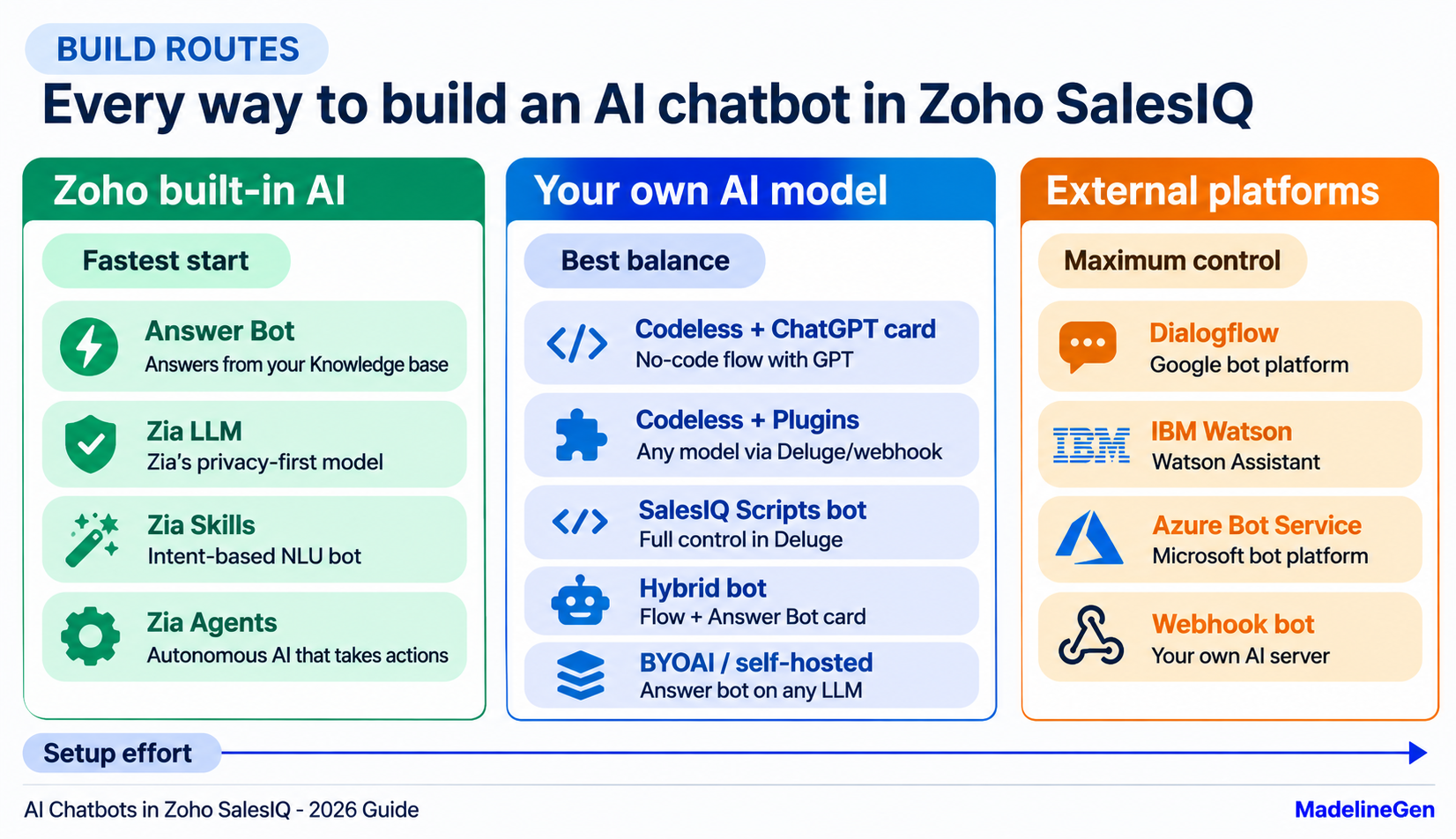
Codeless Bot With ChatGPT
What it is: The Codeless Bot Builder is SalesIQ’s drag-and-drop flow editor. It includes a native ChatGPT card, so you can add OpenAI-powered replies to a guided flow without writing code.
Best for: Guided flows (buttons, forms, bookings) that also need to handle open questions.
Limits: You’re limited to the models and settings the native card supports.
Plugs With Any AI Model
What it is: Plugs are small reusable functions, written in Deluge or connected as webhooks, that you drop into a codeless flow. A plug can call any AI API, including newer ChatGPT models, Gemini or Claude, and pass the answer back into the flow. One plug can be reused in many places in the bot.
Best for: A visual, easy-to-edit flow with a custom AI model or custom CRM logic.
Limits: Needs a developer to build and maintain the plug.
SalesIQ Scripts Bot
What it is: A bot written entirely in Deluge, Zoho’s scripting language. Every visitor message goes through your code. You control the system prompt, the guardrails, conversation memory (using SalesIQ’s session storage), when to call Zoho CRM and when to hand off.
Best for: Serious custom AI assistants, multi-step qualification and complex integrations. This is the route MadelineGen uses most for client AI bots.
Limits: Fully developer-built. Prompt quality and testing make or break it.
Hybrid Bot
What it is: An Answer Bot card added inside a Codeless or Scripts bot. The structured flow handles lead capture and actions, and the knowledge-base AI handles questions, all in one bot.
Best for: Businesses that need sales flows and support answers without running two separate bots.
Zia Skills
What it is: Zoho’s earlier natural language understanding platform. You define intents (“book a service”, “check order status”) and the action for each.
Best for: Predictable, intent-based tasks. For most new builds, an LLM-based route is now more flexible.
Dialogflow, Watson and Azure
What it is: SalesIQ connects to bots built on Google Dialogflow, IBM Watson Assistant and Microsoft Azure Bot Service. The bot logic lives on those platforms and talks to visitors through SalesIQ.
Best for: Businesses that already have a bot on one of these platforms and don’t want to rebuild it.
Webhook Bot
What it is: Your own bot server, for example Python or Node running GPT, Claude or Gemini with your own vector database, connected to SalesIQ through a webhook.
Best for: Maximum control and advanced AI setups (retrieval over large document sets, multi-step agents, custom logging).
Technical limits to plan for:
- The webhook must respond within 5 seconds, or the bot doesn’t reply. Long AI calls need streaming or a fast model.
- SalesIQ signs webhook events with RSA keys. Verify the signature on your server.
- If your server returns a 410 error, SalesIQ deactivates the webhook immediately and emails an alert.
6. AI Model Options
The build route decides how the bot behaves. The AI model decides how smart it is, what it costs and where your data goes.
Native ChatGPT
SalesIQ has a built-in OpenAI integration that supports several ChatGPT models, including OpenAI Assistants. It’s the easiest way to use GPT without custom code.
Native ChatGPT
SalesIQ has a built-in OpenAI integration that supports several ChatGPT models, including OpenAI Assistants. It’s the easiest way to use GPT without custom code.
Zia LLM
Zia is Zoho’s own large language model. Zoho positions it as privacy-first and includes it at no extra AI cost. It’s a strong choice when clients don’t want data sent to an outside AI provider or want predictable costs.
Bring Your Own AI
Bring Your Own AI (BYOAI), added in the Summer 2026 release, lets Answer Bot run on the AI provider you choose, such as Perplexity, Grok or another LLM, connected through a webhook. You can configure it in the Answer Bot settings or directly in the Codeless Bot Builder. The bot keeps using your knowledge base (the SalesIQ resource library or the Zoho Desk knowledge base) and your flows; only the model writing the answers changes.
Self-Hosted Models
BYOAI also supports self-hosted LLMs. For healthcare, insurance, legal or finance businesses with strict data rules, the model can run on infrastructure you control, while SalesIQ still handles the chat, channels and handoff.
GPT vs Gemini vs Claude
All three can power an excellent SalesIQ bot. In practice, the prompt, the knowledge base and the guardrails matter more than the model. We’ve moved a client bot from OpenAI to Gemini without the visitor experience getting worse, because the bot was designed independently of the model.
Zia Skills
What it is: Zoho’s earlier natural language understandin
7. Zia Agents
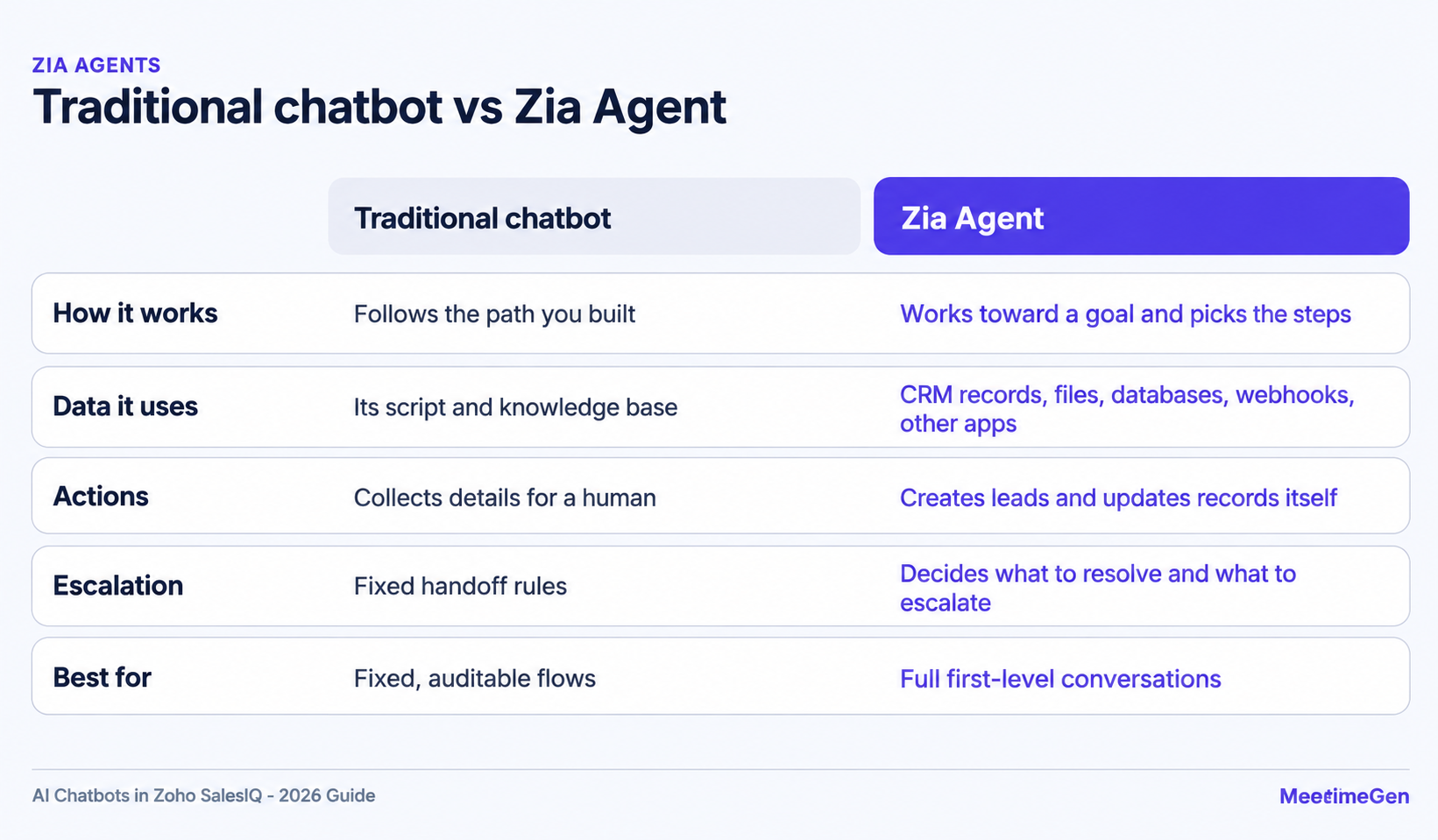
Zia Agents are the biggest change in Zoho SalesIQ in 2026. Introduced in the Summer 2026 release, they are autonomous AI agents that work like digital team members rather than chatbots.
A Zia Agent can:
- Pick up chats and resolve them on its own
- Pull context from CRM records, webhooks, uploaded files, databases, Zoho apps and third-party sources
- Take back-office actions, such as creating a lead in Zoho CRM with the agent set as the lead owner
- Decide what it can resolve and escalate the rest to a human
Agents are built in Zoho’s Agent Studio and deployed into SalesIQ as digital operators. You can run up to ten Zia Agents per SalesIQ portal without buying extra operator licenses.
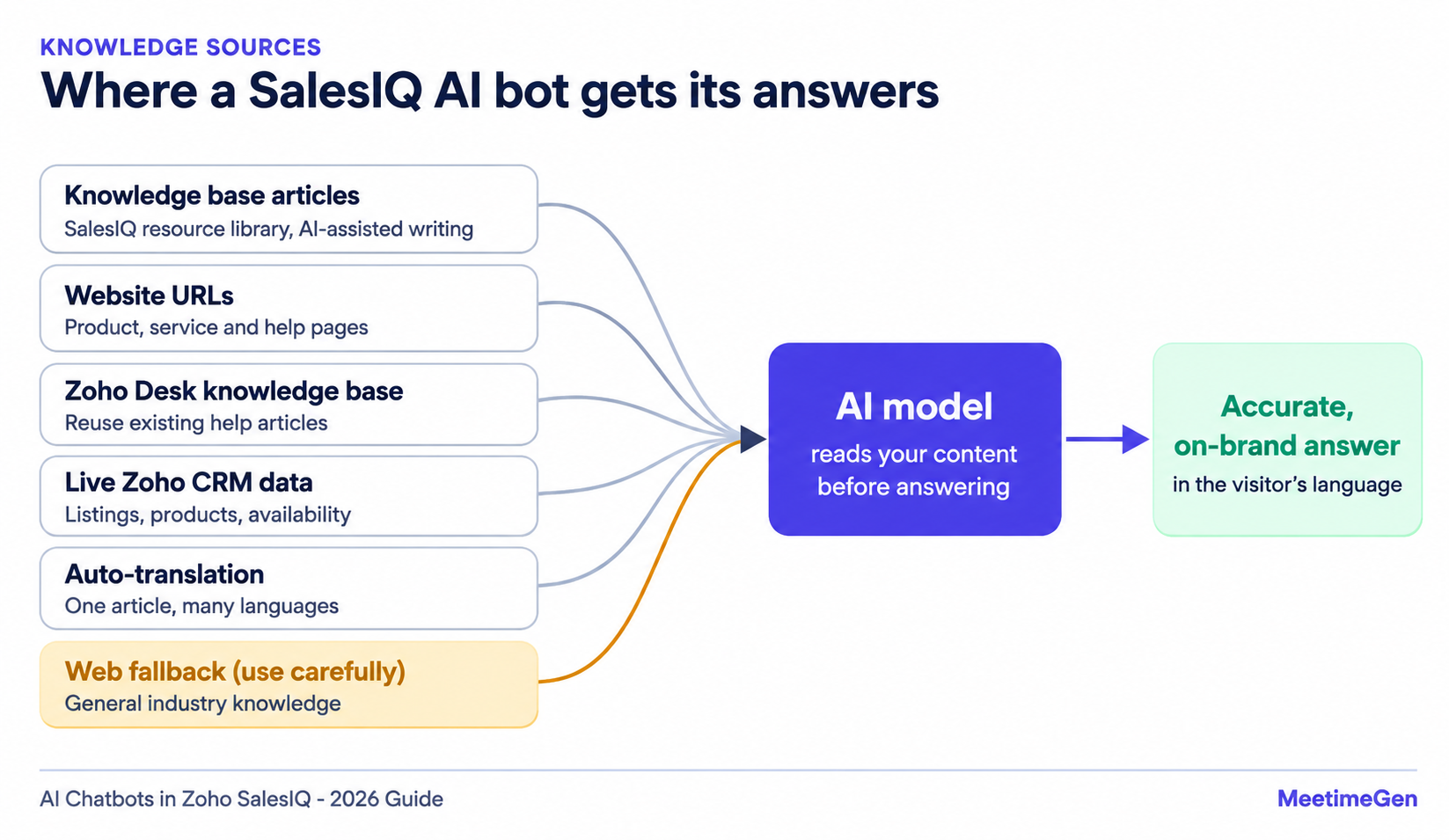
Write FAQ and help articles in the SalesIQ resource library. SalesIQ can also draft and refine articles with AI, which cuts the time to build a knowledge base from scratch.
Website URL Training
Instead of copying content by hand, you can point the bot at your website pages, such as product, service and help pages, and it uses them as reference material. Keep those pages accurate, because the bot will repeat them.
Zoho Desk Knowledge Base
If your help articles already live in Zoho Desk, Answer Bot can use the Desk knowledge base directly as its source.
Auto-Translated Content
SalesIQ can auto-translate your knowledge base into your visitors’ languages, so you don’t have to maintain the same article in several languages. Real-time chat translation also helps your human operators.
Web Knowledge Fallback
When a question isn’t covered in your content, you can let the AI answer general questions about your industry from its wider knowledge. It’s useful, but test it carefully: the more the bot answers outside your own content, the higher the risk of an off-brand or inaccurate reply.
Small Talk
Small Talk adds ready-made replies for greetings and casual chat, so the bot feels friendly instead of robotic.
Trained vs Fine-Tuned
This is the most common confusion we hear from clients.
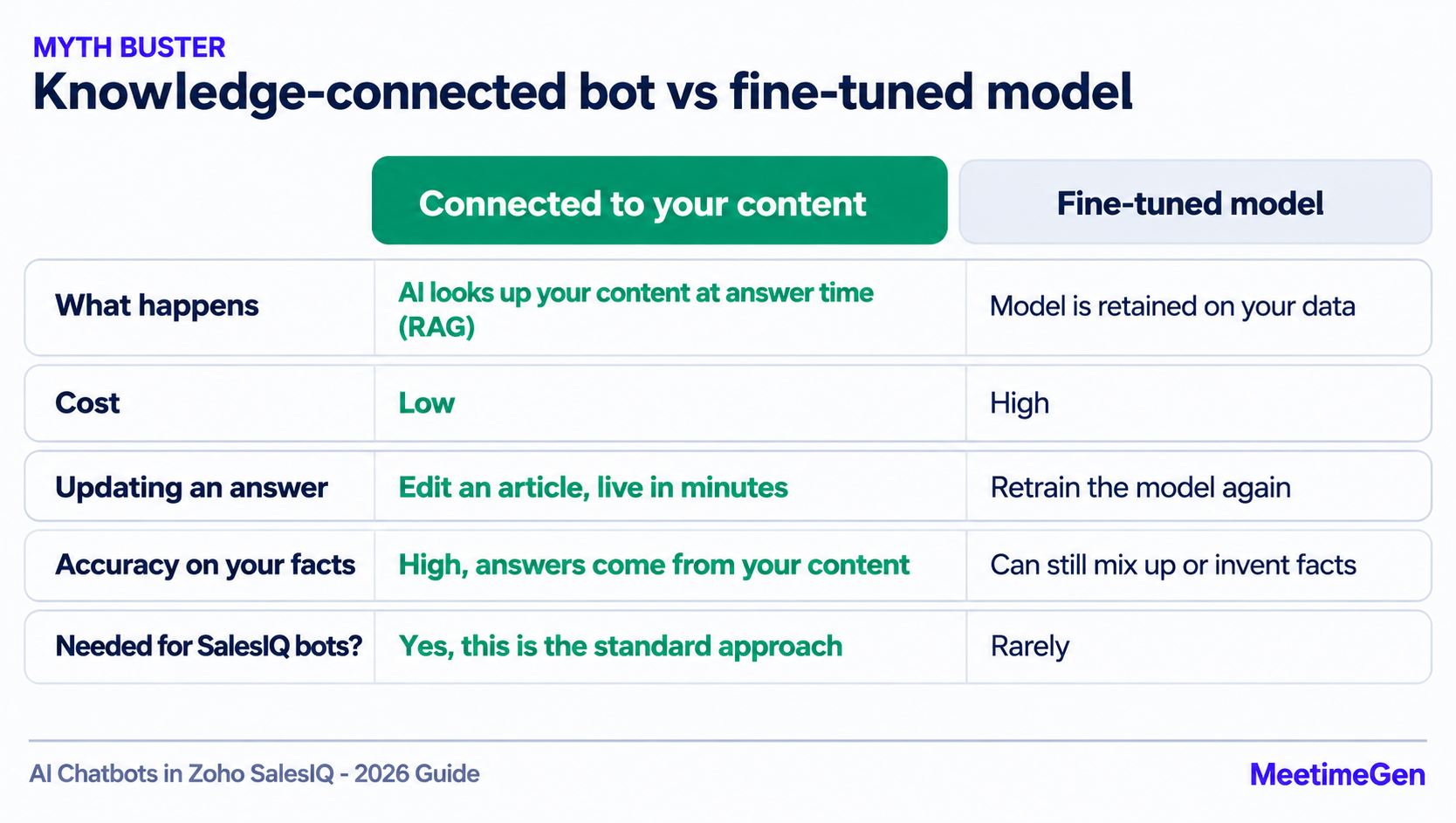
- “Trained on our data” in SalesIQ almost always means the AI reads your knowledge base, website or documents when it answers. This is called retrieval or RAG. The model itself doesn’t change, and updating an answer is as simple as editing an article.
- Fine-tuning means retraining the model itself on your data. It’s expensive, slow to update, and almost never needed for a SalesIQ chatbot.
9. Channels
Your customers don’t only talk to you on your website. The same SalesIQ bot can run on:
- Website live chat
- WhatsApp Business
- Instagram DMs and Story replies
- Facebook Messenger
- Telegram, LINE and WeChat
- Inside your own mobile app, through Mobilisten, SalesIQ’s mobile SDK for iOS, Android, React Native, Flutter, Cordova and Ionic
-
That means one bot, one dashboard and one CRM record per customer, whichever channel they use. Combined with multilingual replies, this is how a small team serves customers across countries around the clock.
10. Actions and Integrations
The real value of an AI bot isn’t that it can talk. It’s that it can do things.
Lead Qualification and CRM Sync
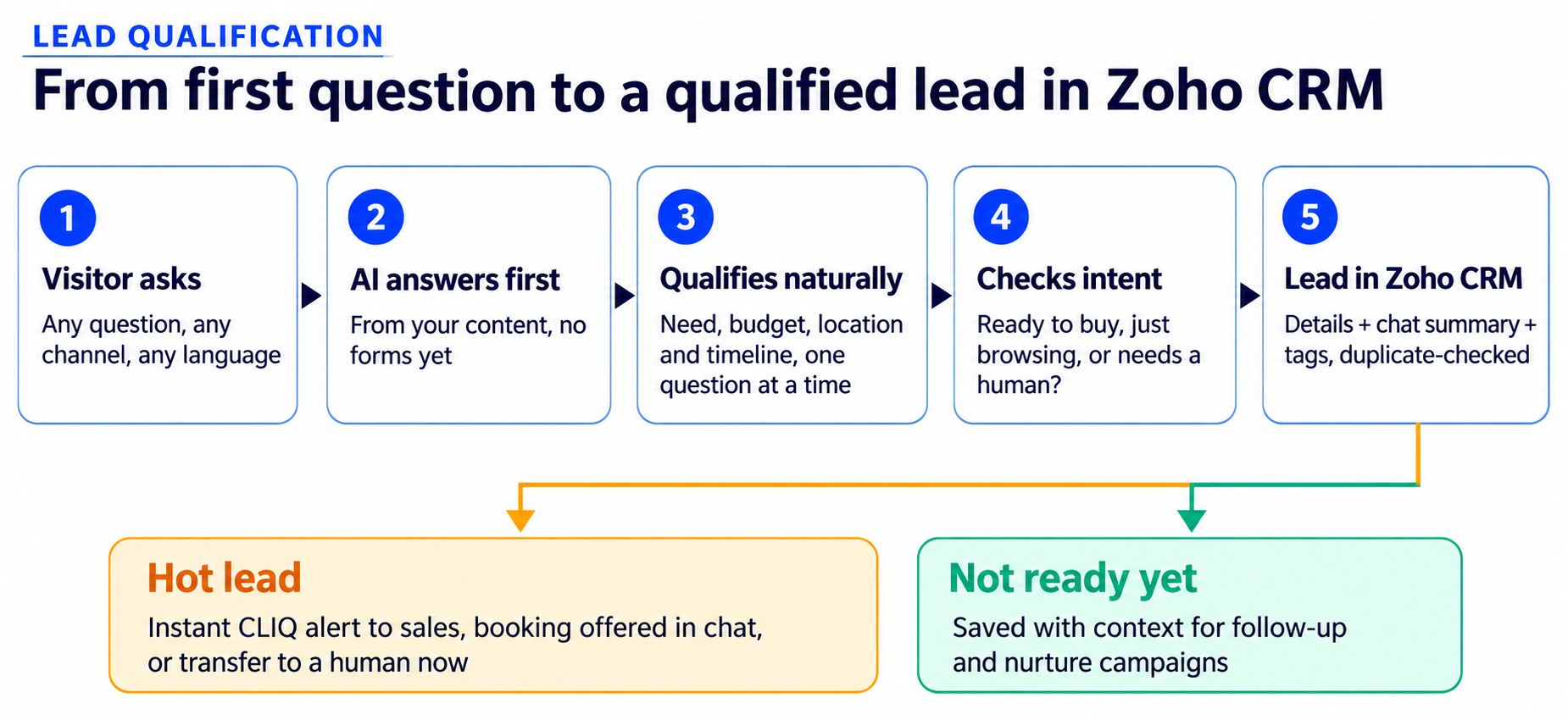
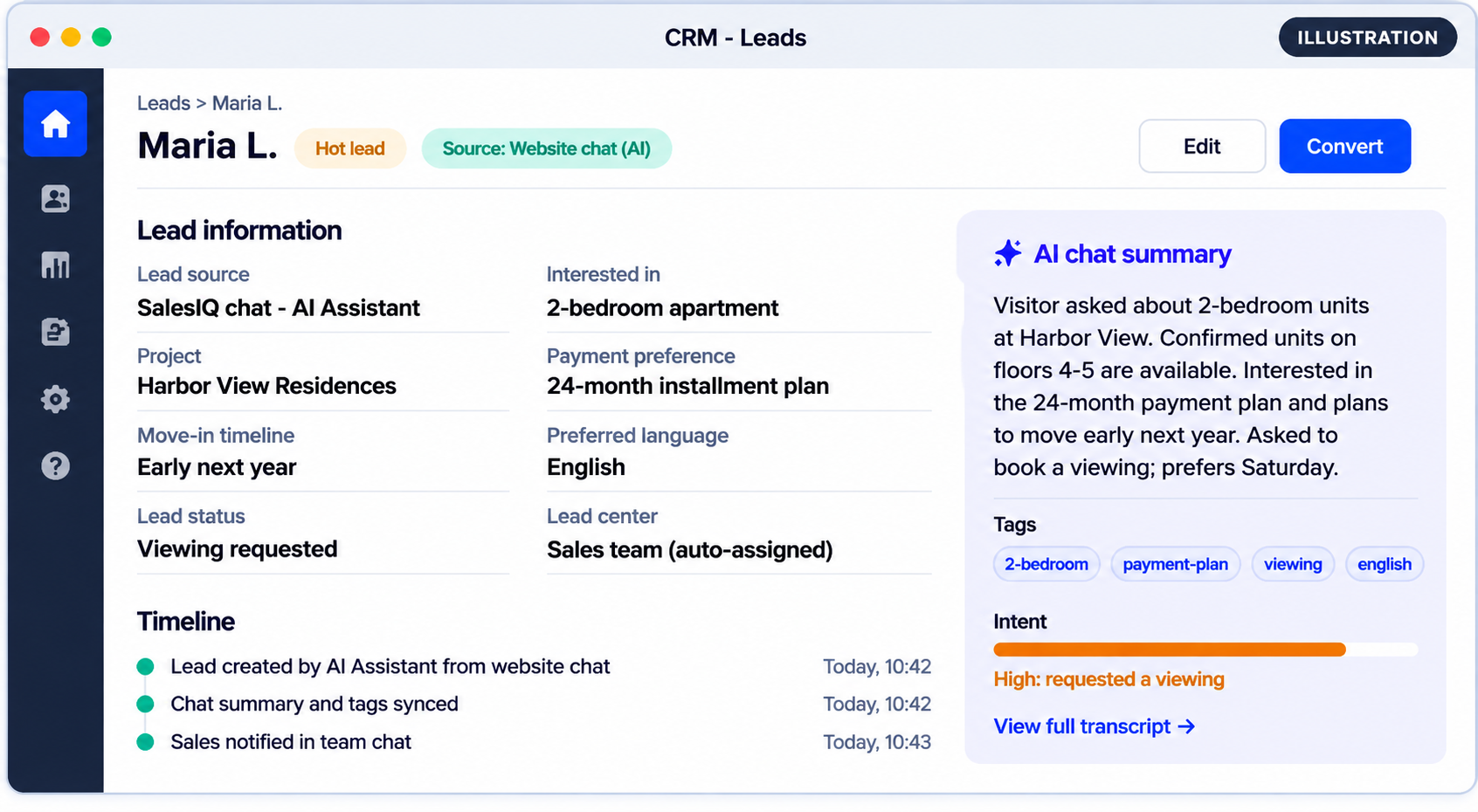
The AI collects what your sales team needs (requirement, budget, location, timeline) through natural conversation instead of a long form. It then creates or updates the Lead or Contact in Zoho CRM. SalesIQ can also sync conversation summaries and tags to Zoho CRM and Zoho Desk, so your team sees the context without reading the transcript.
Live CRM Data in Chat
Bots can pull live data from Zoho CRM during the conversation, such as product details, property listings, stock or availability, so answers are always current.
Bookings and Payments
With the Zoho Bookings integration, the bot can book appointments directly in the chat, including group bookings, custom fields and payments.
Team Notifications
When the bot spots a high-value lead, it can alert your sales team instantly in Zoho Cliq, so hot leads get a reply in minutes, not hours.
Tasks and Tickets
A chat message can become a task or bug in Zoho Projects, with the details pre-filled, or a support ticket in Zoho Desk.
11. Human Handoff
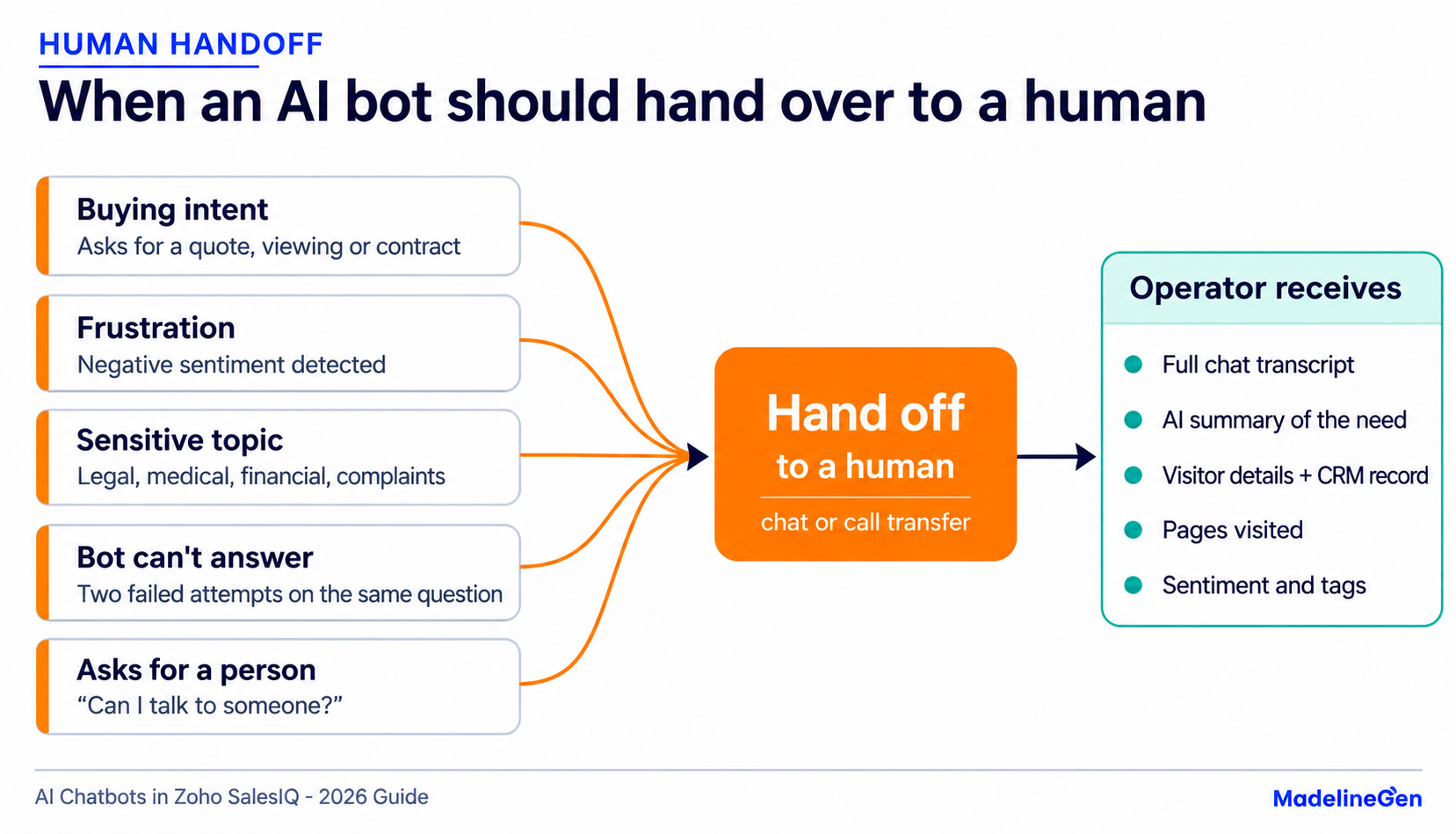
- Sentiment routing. SalesIQ’s AI reads the mood and intent behind messages. When a customer sounds frustrated, the chat can be routed straight to an experienced team member.
- Bot-to-call transfer. SalesIQ can transfer a bot chat to a human operator as a call.
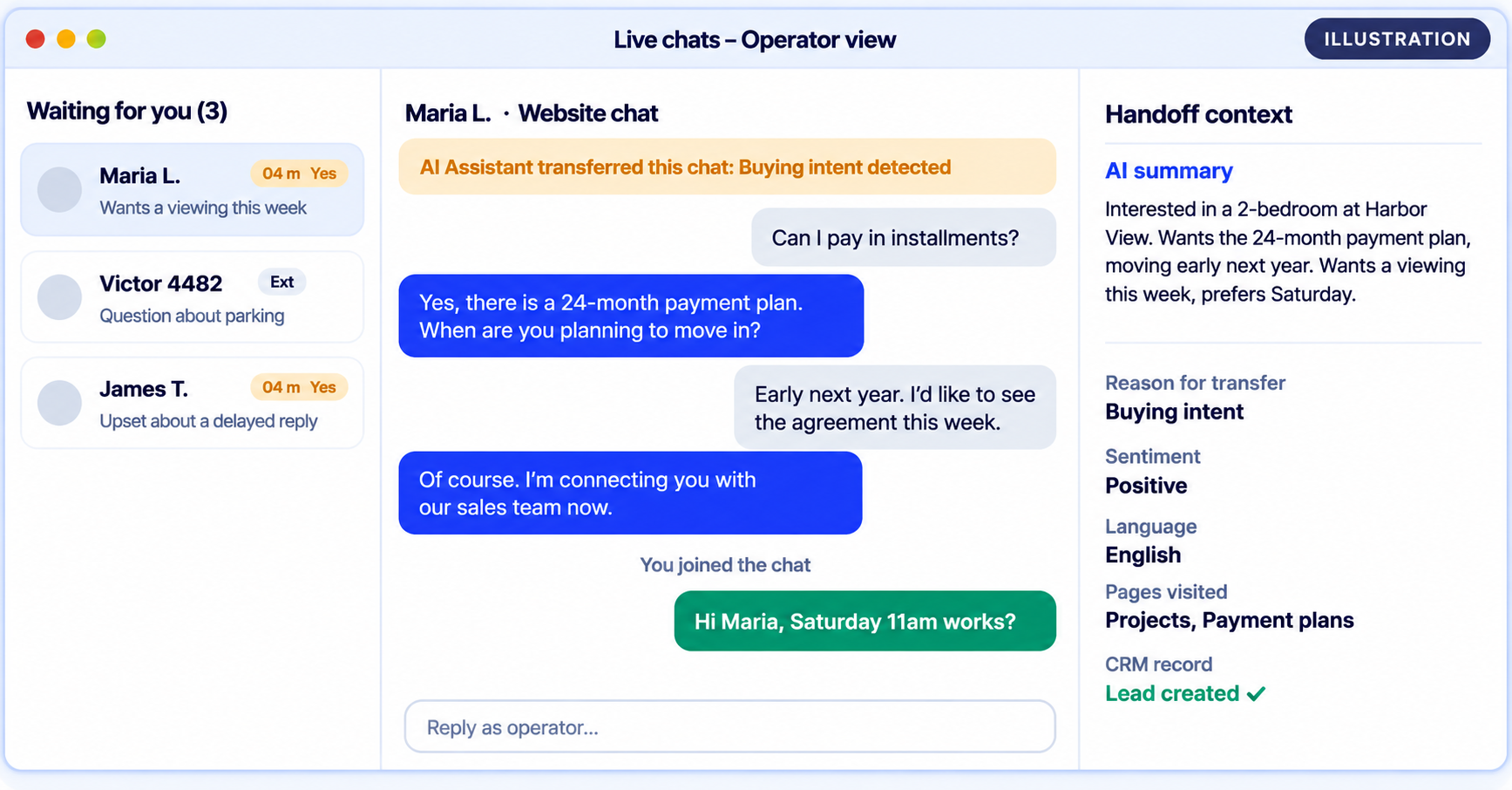
- Context carries over. The operator sees the conversation and summary, so the customer never repeats themselves.
- Clear rules. Your prompt should define exactly when to hand off: buying intent, complaints, sensitive topics, a direct request for a person, or two failed attempts to answer.
12. Monitoring and Quality
- Streaming replies. All of SalesIQ’s AI services support streaming, so answers appear word by word instead of after a pause. Your AI provider has to support streaming; if it doesn’t, the full reply still appears, just not streamed.
- Bot logs. SalesIQ now has bot logs, which make it much easier to see why the AI replied the way it did.
- Unanswered questions. Review what the bot couldn’t answer every week and add it to the knowledge base.
- Conversation reviews. Read a sample of real chats weekly. Most improvements come from small prompt changes found this way.
13. Zoho MCP
Everything above is AI inside SalesIQ. Zoho MCP is the reverse direction: it lets external AI agents, such as Claude or ChatGPT, take actions in your Zoho apps through the Model Context Protocol. Zoho describes it as the execution layer for AI agents rather than a chatbot builder, and it works with any LLM.
Example: instead of opening several Zoho apps, a sales manager asks an AI assistant to pull this week’s hot leads from Zoho CRM and create follow-up tasks, and the agent does it through MCP.
It solves a different problem from a website chatbot, but it’s where Zoho AI is heading and worth planning for.
14. Use Cases by Industry
Real Estate
Answer questions on projects, unit types, availability and payment plans; capture budget, location and move-in timeline; show live listings from Zoho CRM; book viewings; send serious buyers to the sales team.
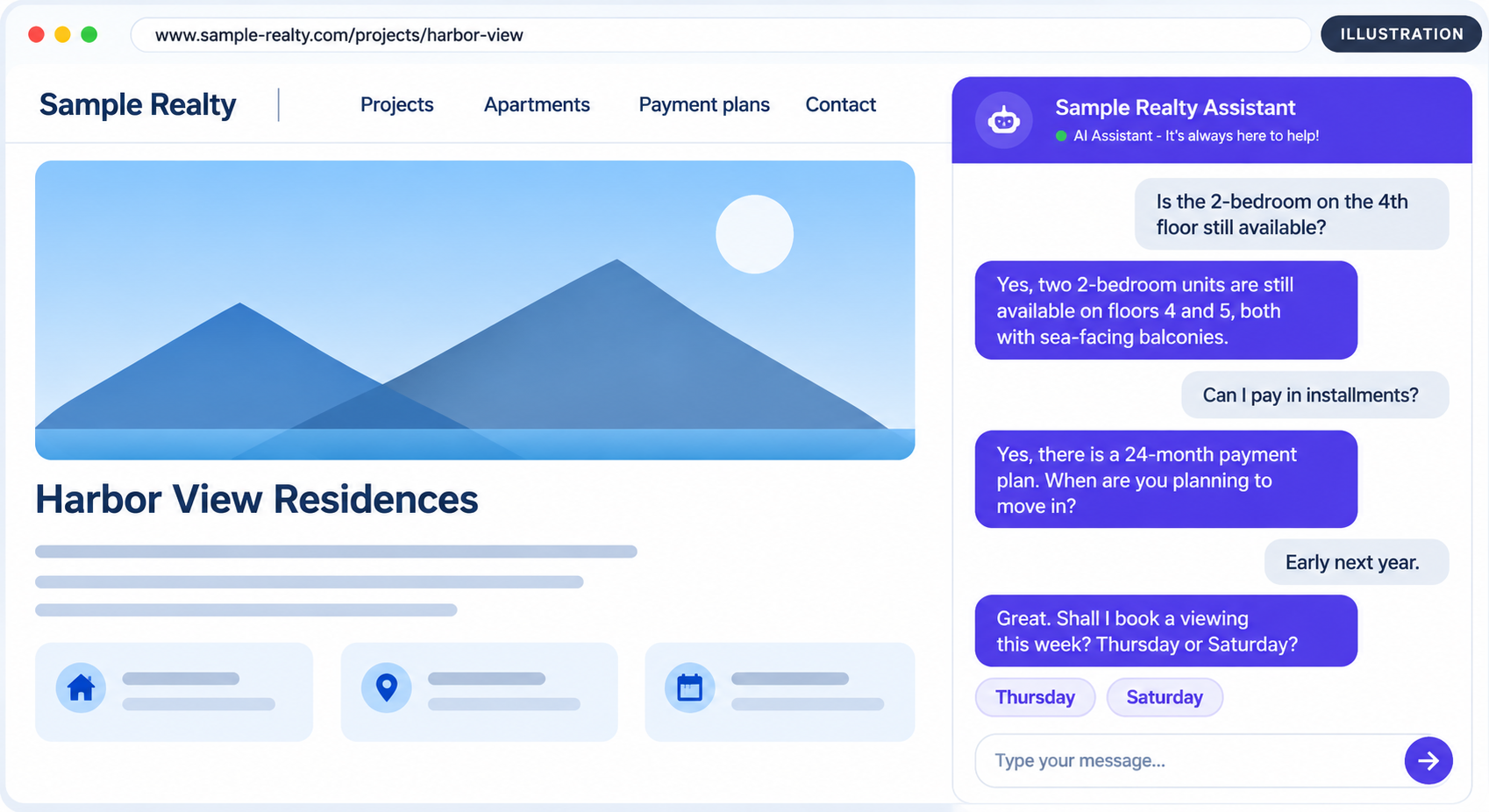
Example: “Is the 2-bedroom on the fourth floor still available, and do you offer installments?” The bot checks availability, explains the payment plan, asks for the buyer’s timeline and creates a qualified lead.
Insurance Broking
Explain policy types in plain language; collect basic risk details; book a call with an advisor. The bot never gives binding quotes or coverage advice, and hands off anything that needs a licensed person.
HVAC and Plumbing
Identify the issue, check the service area, collect equipment make and model, and create a service request. Emergency words like “leak”, “no heat” or “gas smell” trigger an instant handoff.
Home Inspection
Explain inspection types, what’s included and turnaround times; capture the property address and preferred date; create a booking request and confirm it in the chat.
Healthcare and Wellness
Answer general service, location and booking questions only, with strict guardrails. Use a privacy-first or self-hosted model where needed, and never let the bot give medical advice.
15. Case Study
Client: a real estate developer selling residential projects to local and international buyers.
The problem: inquiries came in at all hours and in two languages. The sales team spent too much time on repeat first-level questions, and many inquiries arrived with no useful details.
What we built: an AI assistant inside Zoho SalesIQ using a Scripts bot (Deluge) connected to the Gemini API. It:
- Replies naturally in both English and the local language
- Answers questions about projects and apartments from the client’s own content
- Captures name, email and phone during the conversation and creates the lead in Zoho CRM
- Passes serious buyers to the sales team instead of trying to close the deal itself
What testing taught us:
- The first version went quiet after capturing contact details. It waited for the visitor to ask the next question. We rewrote the prompt so the bot always offers a clear next step.
- It asked for contact details more than once. We added explicit rules so the bot tracks what it already has.
- Visitors who decline shouldn’t be pushed. The bot now stops asking after two declines and closes the conversation politely.
All three were fixed with prompt changes, not code. The biggest lesson: an AI bot is built in testing, not on launch day. The first version always needs real conversations to get right.
The project also started on OpenAI and later moved to Gemini, which showed that a well-designed SalesIQ bot isn’t locked to one AI provider.
Where it stands now: the assistant is live, handling first-level buyer conversations in both languages and passing contact details and context to the sales team. Prompt tuning continues based on real conversations, which is exactly how an AI bot keeps improving after launch.
Want a similar assistant for your business? Book a free SalesIQ AI review with MadelineGen.
16. How to Choose
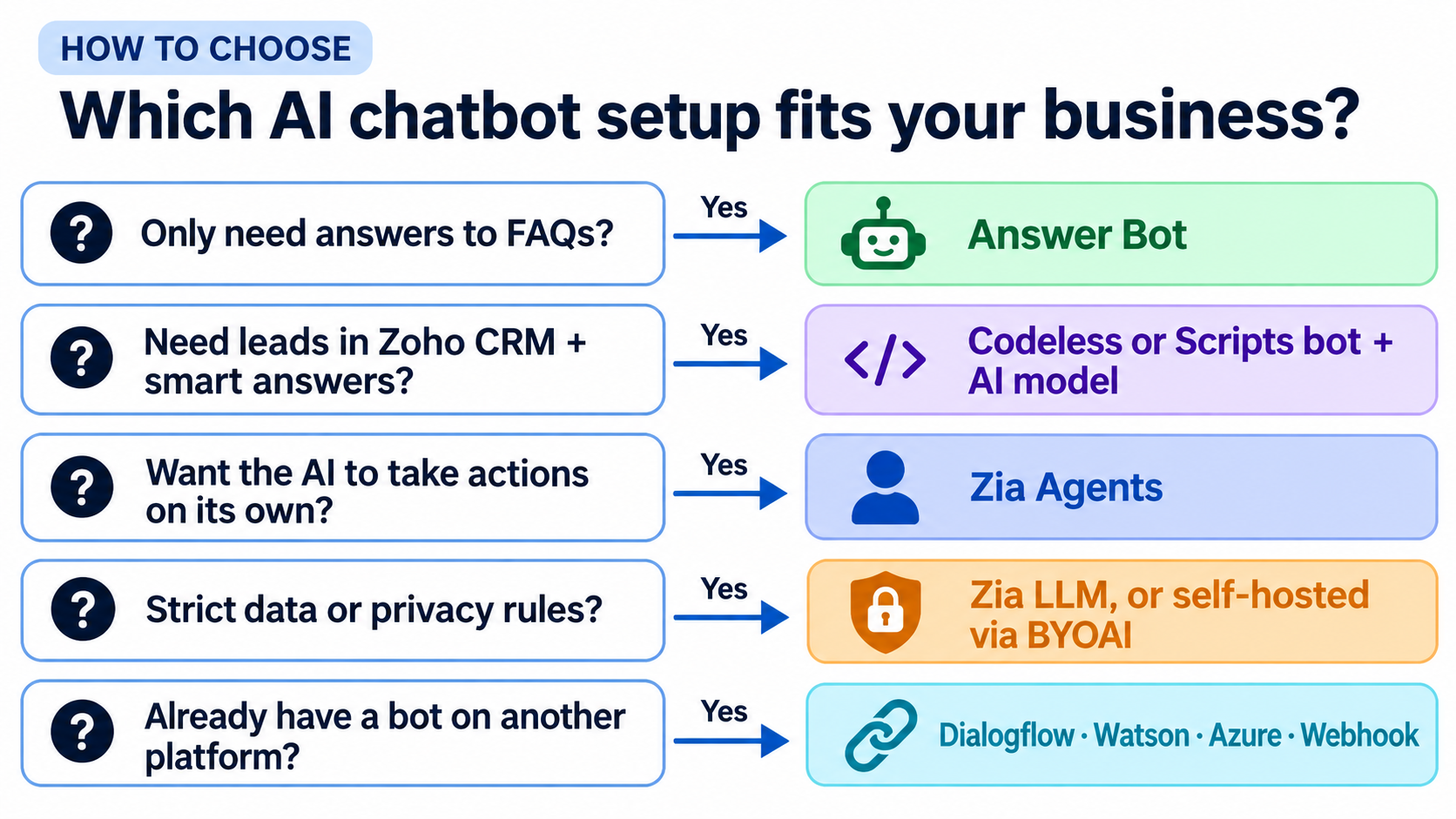
Rule of thumb:
- Just need FAQ answers → Answer Bot
- Need leads in Zoho CRM plus smart answers → Codeless or Scripts bot with an AI model
- Want the AI to take actions on its own → Zia Agents
- Strict data rules → Zia LLM, or a self-hosted model through BYOAI
- Already have a bot elsewhere → Dialogflow, Watson, Azure or webhook
Not sure which setup fits your business? MadelineGen offers a free 20-minute SalesIQ AI review: we’ll look at your current setup and tell you which route fits, with no obligation. See what’s included.
17. Implementation Steps
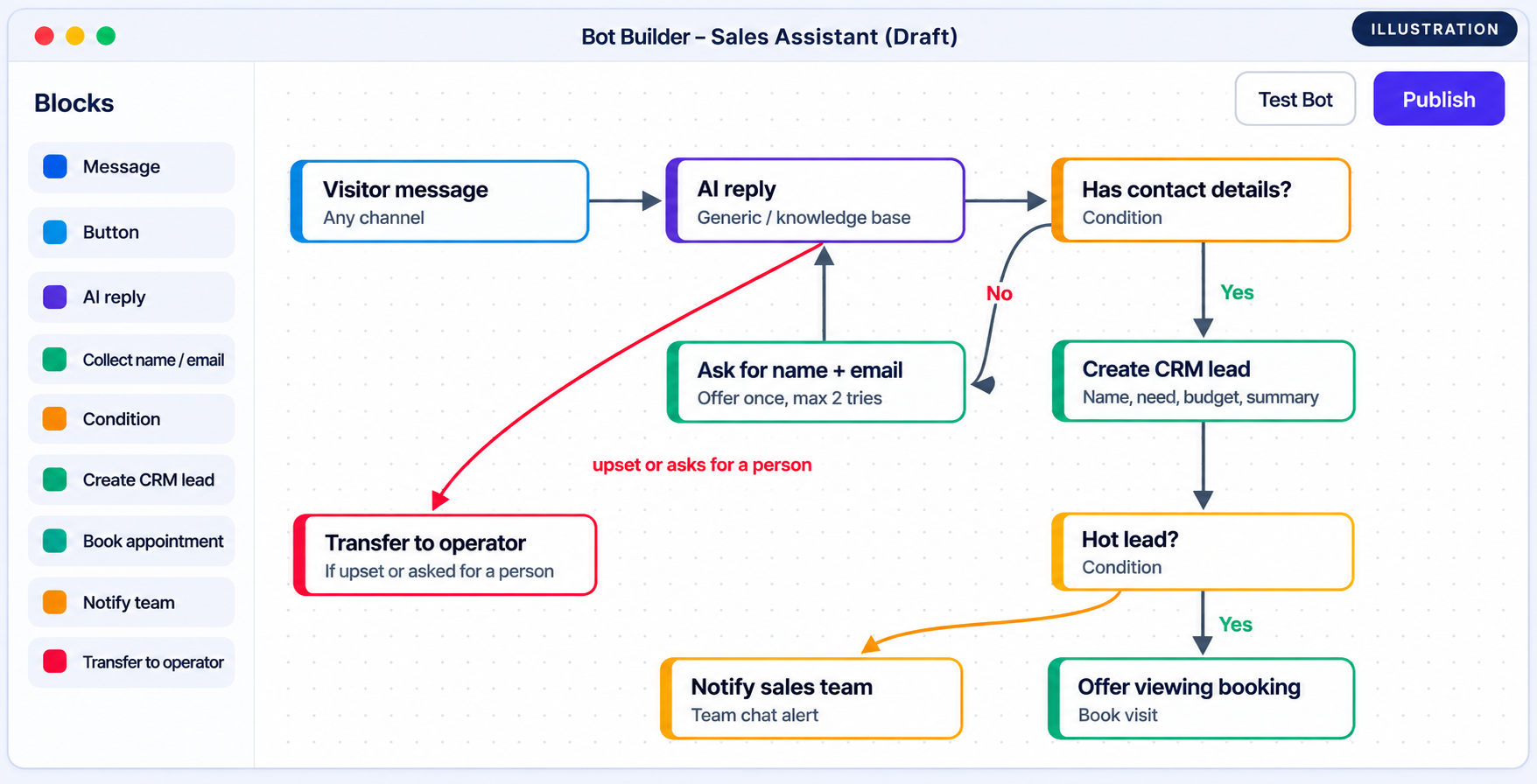
This is the process MadelineGen follows for every client AI chatbot in Zoho SalesIQ:
- Define the goal. Leads, support deflection, bookings, or all three. Decide what counts as a “qualified” lead.
- Collect real questions. Pull 50 to 100 real inquiries from email, chat history and call notes.
- Prepare the knowledge. Clean up the knowledge base and website pages the bot will use. Remove outdated or conflicting content.
- Pick the route and model. Use the decision tree above.
- Write the system prompt and guardrails. Role, tone, what the bot can discuss, what it must never say, and when to hand off.
- Connect Zoho CRM and actions. Field mapping for leads, conversation summaries, bookings and Cliq alerts.
- Test with real questions. Including awkward ones, off-topic ones and attempts to get prices or promises out of the bot.
- Launch and review weekly. Read conversations, check unanswered questions and bot logs, and tune the prompt.
18. Cost Factors
There’s no single price for an AI chatbot in Zoho SalesIQ. The cost depends on:
- SalesIQ plan. Some AI features, channels and limits depend on your plan and data center, so check Zoho’s current pricing page.
- AI model usage. Zia LLM has no extra AI cost. ChatGPT, Gemini and Claude are billed by the provider per usage, so cost grows with conversation volume and length.
- Channel costs. Messaging channels such as WhatsApp can carry per-conversation charges.
- Build effort. An Answer Bot can run in a day. A custom assistant with qualification, CRM sync and handoff usually takes one to three weeks including testing.
- Ongoing tuning. Plan a few hours a month for reviewing conversations and updating content.
Ways to keep AI costs predictable: choose a smaller or cheaper model for simple questions, limit reply length, send only the conversation history the AI needs, and answer common questions from the flow instead of the model.
19. Common Mistakes
- No guardrails. Without clear rules, AI can invent prices, promise discounts or give advice it shouldn’t. Define what the bot must never say.
- A messy knowledge base. Outdated or conflicting content produces wrong answers.
- No handoff plan. A bot that can’t reach a human frustrates exactly the visitors most ready to buy.
- Not syncing to Zoho CRM. If conversations don’t reach the CRM, you lose most of the value.
- Asking too many questions up front. Answer the visitor first, then qualify.
- Turning on web fallback without testing. It widens what the bot answers, and the risk with it.
- Ignoring technical limits. For example, the 5-second webhook timeout.
- Launching without real testing. Test with real questions, not just ideal ones.
- Never reviewing conversations. Weekly reviews are how a good bot becomes a great one.
20. Launch Checklist
☐ Goal and “qualified lead” definition agreed
☐ Knowledge base and website pages reviewed and current
☐ System prompt with tone, scope, forbidden topics and handoff rules
☐ Zoho CRM field mapping tested, including duplicates
☐ Conversation summary syncing to the CRM record
☐ Hot-lead alerts or bookings working
☐ Human handoff tested during and outside business hours
☐ Tested on every channel the bot runs on
☐ Privacy policy updated to mention the AI chatbot
☐ Weekly review owner assigned
21. Glossary
Zobot: Zoho SalesIQ’s chatbot-building platform, used to create rule-based or AI-powered bots.
Answer Bot: SalesIQ’s bot that answers questions from a knowledge base using AI.
Plug: A reusable function in SalesIQ, written in Deluge or as a webhook, used inside Codeless bots.
Deluge: Zoho’s scripting language, used for SalesIQ Scripts bots and Plugs.
Zia: Zoho’s AI, including its own large language model.
Zia Agents: Autonomous AI agents in SalesIQ that resolve chats and take actions.
BYOAI: Bring Your Own AI, which lets Answer Bot run on an AI provider you choose.
LLM: Large language model, the AI that understands and writes text (ChatGPT, Gemini, Claude, Zia).
RAG: Retrieval-augmented generation. The AI looks up your content before answering.
System prompt: The instructions that define the bot’s role, tone and rules.
Hallucination: When an AI gives a confident but wrong answer.
MCP: Model Context Protocol, a standard that lets AI agents take actions in apps such as Zoho.
22. FAQ
Can I use ChatGPT in Zoho SalesIQ?
Yes. The SalesIQ Codeless Bot Builder has a native ChatGPT card, and you can call any OpenAI model through Plugs, a SalesIQ Scripts bot or a webhook bot.
Can I use Gemini or Claude in Zoho SalesIQ?
Yes. You can call the Gemini or Claude API from a Plug, a SalesIQ Scripts bot written in Deluge, or your own server connected as a webhook bot. Answer Bot can also run on other AI providers through Bring Your Own AI (BYOAI).
What are Zia Agents in Zoho SalesIQ?
Zia Agents are autonomous AI agents added in the SalesIQ Summer 2026 release. They pick up chats, use data from CRM records, files, databases and other apps, take actions such as creating leads in Zoho CRM, and escalate to a human when they can’t resolve something. You can run up to ten per SalesIQ portal without extra operator licenses.
What is the difference between Answer Bot and Zobot?
Answer Bot answers questions from your knowledge base. Zobot is SalesIQ’s bot-building platform for structured flows and actions, such as lead capture, bookings and CRM updates. You can combine them by adding an Answer Bot card inside a Zobot.
Do I need to fine-tune an AI model for my SalesIQ chatbot?
Almost never. Connecting the AI to your knowledge base, website pages or documents gives accurate answers that are easy to update. Fine-tuning retrains the model itself and is slow, expensive and rarely needed for a website chatbot.
Does a Zoho SalesIQ AI chatbot work on WhatsApp and Instagram?
Yes. The same SalesIQ bot can run on your website, WhatsApp, Instagram, Facebook Messenger, Telegram, LINE and inside mobile apps through the Mobilisten SDK.
Can a SalesIQ chatbot create leads in Zoho CRM automatically?
Yes. The bot can collect details during the chat and create or update a Lead or Contact in Zoho CRM, and SalesIQ can sync conversation summaries and tags to the record.
How much does an AI chatbot in Zoho SalesIQ cost?
It depends on your SalesIQ plan, the AI model and how much it is used, and the build effort. Zoho’s Zia LLM has no extra AI cost, while external models like ChatGPT, Gemini or Claude are billed by the provider based on usage.
Is customer data safe with an AI chatbot in SalesIQ?
It depends on the setup. Send only the data the AI needs, pick a provider that fits your data policy, and for strict requirements use Zoho’s privacy-first Zia model or a self-hosted LLM through BYOAI.
How long does it take to build an AI chatbot in Zoho SalesIQ?
A knowledge-base Answer Bot can run in a day. A custom AI assistant with lead qualification, CRM sync and human handoff usually takes one to three weeks including testing with real conversations.
23. Book a Free SalesIQ AI Review
If you already use Zoho SalesIQ and your bot feels robotic, or you want an AI assistant that captures qualified leads into Zoho CRM around the clock, the MadelineGen team can help.
What you get in a free 20-minute review:
- A quick look at your current SalesIQ setup and bot, if you have one
- The build route and AI model that fit your business (ChatGPT, Gemini, Claude, Zia or Zia Agents)
- The two or three changes that would bring the biggest improvement in leads or response time
- A clear idea of the effort involved, with no obligation
Start a conversation with the chat on this page, or use the contact form to book your review with Aman at MadelineGen.
MadelineGen is a Zoho consulting and implementation agency helping businesses in the US, UK, Australia and India get more out of the Zoho ecosystem: Zoho CRM, Creator, Books, Analytics, SalesIQ, Sign, Flow, People and Payroll. We specialize in connecting Zoho with AI models such as ChatGPT, Gemini and Claude, for clients in insurance broking, HVAC and plumbing, real estate and home inspection.
Aman Maurya, Co-Founder of MadelineGen. Aman leads MadelineGen’s Zoho and AI work, from Zoho CRM and Creator builds to AI assistants in Zoho SalesIQ connected to ChatGPT, Gemini and Claude. He works closely with every client, from the first requirements call to testing the finished bot with real conversations, for businesses in the US, UK, Australia and India.
Follow MadelineGen on LinkedIn